Katherine Font Embroidery Design: A Practical Guide to Personalization
Personalizing fabric with names, dates, or meaningful quotes transforms a standard item into a cherished keepsake. For many creators, the Katherine Font Embroidery Design stands out as a versatile tool for achieving this effect. It offers a high-quality script that balances elegance with readability, making it suitable for everything from baby blankets to corporate uniforms. However, owning the file is only the first step. The true value of this design lies in how you apply it, and there are several common pitfalls that can turn a beautiful font into a frustrating project.
Understanding What You Are Buying
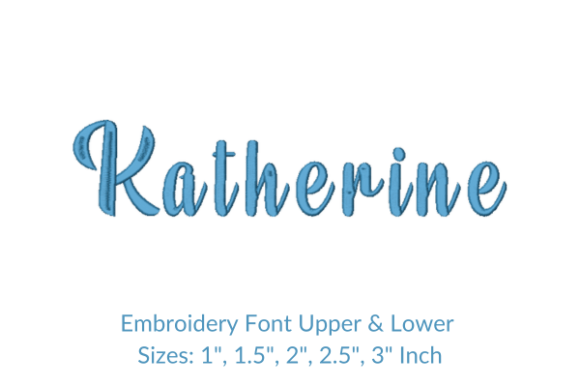
Before diving into your machine settings, it is crucial to understand exactly what the Katherine Font Embroidery Design package contains. Many buyers assume they are purchasing a single image, but this is actually a comprehensive set of 260 individual letter designs. This includes uppercase, lowercase, numbers, and symbols, all designed to work together seamlessly.
A frequent misunderstanding occurs regarding the dimensions listed on product pages. The size specifications you see—often showing width and height—are typically based on the letters "A" and "a." While these provide a useful baseline, they do not represent every character equally. In cursive and script fonts, some letters like "W" or "M" naturally require more horizontal space, while others like "i" or "l" are much narrower. If you plan your layout solely based on the "A" measurement without accounting for these variances, your final text may run off the edge of your hoop or appear cramped.
To avoid this, always consult the detailed dimension guide provided with the download. Most reputable sellers include a "More Sewing Info PDF" button that lists the exact dimensions for all 260 characters. Checking this document before you start ensures that your text fits perfectly within your chosen fabric area, saving you time and thread.
Common Mistakes in File Preparation
One of the most overlooked aspects of using digital embroidery fonts is the importance of spacing and kerning. When you type a name or quote into your embroidery software, the default spacing might look correct on the screen but fail in reality. Script fonts like Katherine rely heavily on the flow between letters. If the spacing is too tight, stitches can merge, creating dense blobs of thread that obscure the design. If the spacing is too wide, the elegant connection between letters breaks, ruining the visual continuity.
Practical Advice: Never trust the on-screen preview alone. Always create a test run on a scrap piece of stabilizer and fabric. Adjust the spacing manually in your software until the letters sit comfortably next to each other without touching. This small adjustment makes a significant difference in the professional finish of your work.
Another critical error involves ignoring the stitch count relative to your project's timeline. Because the Katherine Font is detailed, longer words or sentences can result in a high stitch count. If you are working on a deadline or managing a batch of orders, underestimating the time required to embroider a long quote can lead to missed delivery dates. Always calculate the total stitch count for your specific phrase and multiply it by your machine's average stitches-per-minute rate to get an accurate production time.
Selecting the Right Stabilizer and Thread
The quality of your final embroidery is often dictated by the foundation you build beneath it. A common mistake when using intricate fonts is using insufficient stabilizer. The Katherine Font features curves and fine lines that require strong support to prevent puckering. Without adequate backing, the fabric can distort during stitching, causing the delicate parts of the letters to collapse or shift.
For lightweight fabrics like cotton shirts or linens, a cut-away stabilizer is often superior to tear-away options. Cut-away provides permanent support that holds the shape of the script over time, especially after washing. On heavier materials like denim or towels, a medium-weight tear-away might suffice, but testing is still essential. Remember, the goal is to make the thread float above the fabric, not sink into it.
Thread choice also plays a vital role. Using thick, heavy-duty thread on a fine script font can overwhelm the design details. The Katherine Font looks best with standard polyester or rayon threads that match the weight of the design's intended scale. If you need to highlight a specific word, consider changing the thread color rather than the thread thickness, which could alter the stitch density and cause tension issues.
Navigating File Formats and Compatibility
When downloading the Katherine Font Embroidery Design, you will likely receive multiple file formats. This is a feature, not a bug, designed to ensure compatibility with various embroidery machines. However, confusion often arises when users try to use a format their machine does not support, leading to errors or corrupted data.
Before you begin, verify the specific file extension your embroidery machine requires. Common formats include .PES, .JEF, .DST, and .EXP. If you are unsure, check your machine's manual or the manufacturer's website. Most modern design files come with a broad range of formats to cover major brands, but if your machine is older or less common, you may need to convert the file using third-party software.
It is also worth noting that converting files can sometimes alter stitch paths. If possible, use the native format provided in the download pack rather than converting it unnecessarily. This preserves the original design integrity and ensures that the satin stitches and fill patterns render exactly as the designer intended.
Maximizing Your Investment
Investing in a high-quality font like Katherine should yield consistent results across multiple projects. To get the most out of this resource, organize your digital files effectively. Create folders for different sizes and styles so you can quickly locate the version you need for a specific job. This organization becomes invaluable when you are juggling multiple client requests or custom orders.
Furthermore, take advantage of the versatility of the font. While it is excellent for names, do not limit yourself to just that. Use it for short quotes on tote bags, monograms on napkins, or decorative elements on home decor items. The ability to mix and match sizes allows you to create dynamic compositions where the font acts as both text and graphic art.
Finally, remember that practice refines technique. Even experienced embroiderers encounter new challenges with different fonts. By understanding the specific needs of the Katherine Font—from its dimensional quirks to its stabilizer requirements—you can avoid costly mistakes and produce professional-grade embroidery every time. With the right preparation and attention to detail, this font becomes an indispensable asset in your creative toolkit.